Turn your iPhone into a Bluetooth microphone
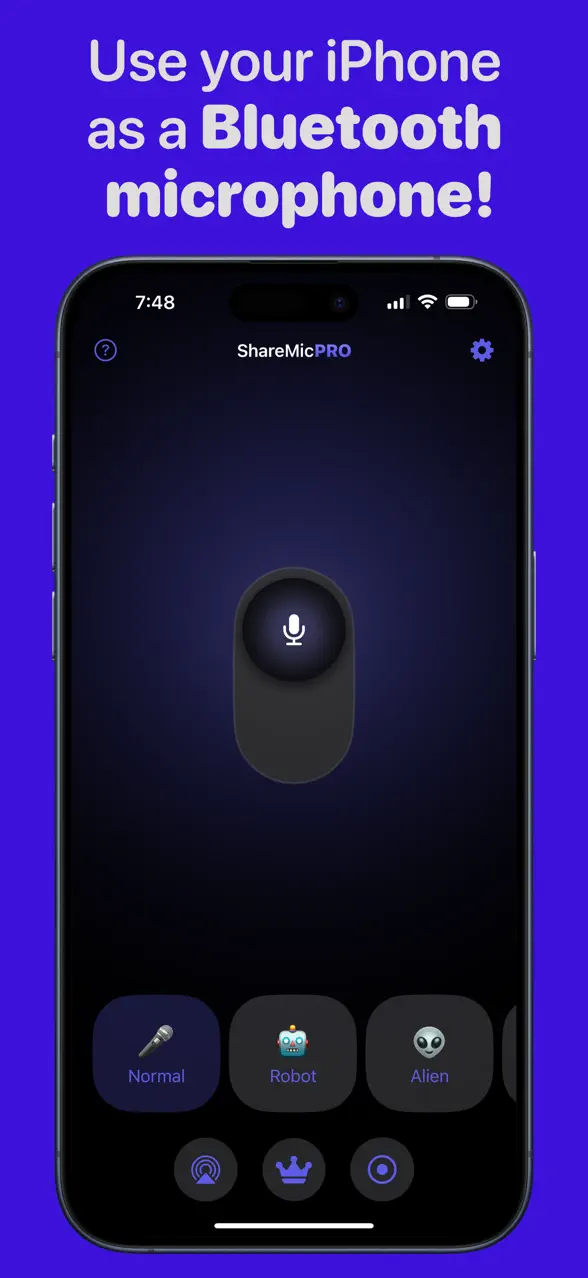
ShareMic streams your voice live to any Bluetooth or AirPlay speaker. Perfect for karaoke nights, events, and turning any speaker into your stage — completely wireless.

Being heard shouldn't be this hard
The usual ways to amplify your voice are clunky, costly, or let you down at the worst moment.
Your phone speaker can't fill the room
You strain your voice and the people at the back still can't hear you — the moment falls flat.
Mics and megaphones add up fast
Dedicated gear is one more thing to buy, charge, and lug around for something you do a handful of times a year.
When your gear dies, the show stops
A dead mic with no backup leaves you silent in front of everyone, right when it matters most.
Your voice, on any speaker
Everything you need to turn your iPhone into a wireless live microphone.
Live voice streaming
Speak or sing and hear your voice in real time through your connected speaker.
Bluetooth & AirPlay
Send your voice to any Bluetooth speaker, AirPlay device, or smart TV.
Real-time voice changer
A live voice changer — Robot, Alien, Chipmunk, autotune and hall/cave reverb transform your voice as you speak. Perfect for karaoke and laughs.
One-tap control
Start or stop your live session instantly with a single tap.
Karaoke-ready
Combine your voice with backing tracks for the ultimate karaoke setup.
Record & replay
Capture your effected voice to an audio file and play it back from your recordings gallery (ShareMic Pro).
Clean, feedback-free sound
A noise gate and smart feedback suppression keep your voice clear and stop speaker howl.
Low latency
Optimized for low-lag voice output so your words land in time.
Play with your voice
A real-time voice changer for your iPhone — switch your voice live, mid-sentence. Great for karaoke rounds, pranks and content.
Normal
Your real voice, clean and clear.
Robot
Turn metallic and synthetic.
Alien
Otherworldly, pitched and weird.
Chipmunk
High-pitched and hilarious.
Autotune
Snap your singing to pitch.
Hall reverb
Big, roomy stage sound.
Cave reverb
Deep, echoey and dramatic.
Live in three taps
No cables, no extra hardware. Just your iPhone and a speaker.
- 0130 sec
Connect your speaker
Pair any Bluetooth speaker or pick an AirPlay device from your iPhone.
- 0210 sec
Open ShareMic & tap the mic
Tap the big mic button to go live. Pick a voice effect if you want some fun.
- 03Instant
Start talking or singing
Your voice plays instantly through the speaker. You're on stage.
One app, endless moments
However you want to be heard, ShareMic has you covered.
See all use cases →Karaoke nights
Host karaoke at home using your iPhone as a wireless mic with backing tracks and fun effects.
Events & megaphone
Amplify your voice in classrooms, small gatherings, and events through any speaker.
Content creation
Play with voice effects to record fun, expressive clips for social media.
Backup microphone
Use it as a reliable backup mic when your hardware fails mid-event.

Works with the speakers you already own
If it plays audio over Bluetooth or AirPlay, ShareMic can use it as your microphone output.
AirPlay, HomePod and Apple TV are trademarks of Apple Inc. ShareMic is not affiliated with Apple.
Start free, upgrade when you want
The live microphone is free forever. Unlock effects and recording with ShareMic Pro.
Free
- Live voice streaming
- Bluetooth & AirPlay output
- Normal voice
- Noise gate & feedback suppression
- One-tap go live
ShareMic Pro
- Everything in Free
- All voice effects — Robot, Alien, Chipmunk, Autotune
- Hall & Cave reverb
- Record & replay your sessions
- Recordings gallery

ShareMic Pro is an optional subscription. Requires iOS 18.0 or later.
Frequently asked questions
Everything about using your iPhone as a Bluetooth microphone.
How do I use my iPhone as a Bluetooth microphone?⌄
Connect your iPhone to any Bluetooth or AirPlay speaker, open ShareMic, and tap the microphone button. Your voice streams live to the speaker instantly — no extra hardware needed.
Can I use my iPhone as a wireless microphone for a speaker?⌄
Yes. ShareMic turns your iPhone into a wireless microphone — pair any Bluetooth speaker or AirPlay device and your voice plays through it live, so your phone works as a speaker mic with no cables.
Does ShareMic work as a voice changer?⌄
Yes. ShareMic includes real-time voice changer effects — Robot, Alien, Chipmunk, autotune and Hall and Cave reverb — that transform your voice live as you speak or sing. (Effects are part of ShareMic Pro.)
Does ShareMic work with AirPlay and smart TVs?⌄
Yes. ShareMic supports both Bluetooth speakers and AirPlay devices, including AirPlay-compatible smart TVs and receivers.
Is there any audio delay (latency)?⌄
ShareMic is optimized for low-latency voice output over Bluetooth. AirPlay may introduce more delay than Bluetooth — the app includes tips to help you get the lowest latency.
Can I use ShareMic for karaoke?⌄
Absolutely. ShareMic is karaoke-ready: play your backing track, pick a voice effect like a hall reverb, and sing through any connected speaker.
Does ShareMic record or store my voice?⌄
Your live voice is streamed in real time, not recorded. ShareMic Pro adds an optional recording feature — and anything you record is saved only on your device as an audio file, never uploaded to our servers. You can delete your recordings anytime.
How much does ShareMic cost?⌄
ShareMic is free to download, and the live microphone with the Normal voice is free to use. ShareMic Pro is an optional subscription that unlocks all voice effects and recording. It requires iOS 18.0 or later.
Make your voice heard — anywhere
Download ShareMic free and turn any speaker into your stage.